Registering Hot Folders
Register the hot folder used by Production Flow.
Production Flow uses the hot folders associated with the printer. Therefore, the hot folder for the digital front end used by the printer
must be registered to Production Flow.
The hot folders set on your computer using the various Epson digital front ends available are automatically registered, so
you do not need to register them again.
You need to specify the hot folder when setting up with an RIP server (print server) or a digital front end made by a third
party.
-
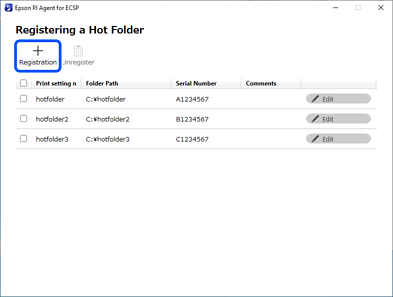
1Click the start button in Windows, and then select Epson Software > Epson PJ Agent for ECSP to start Epson PJ Agent for ECSP.
The Registering a Hot Folder screen is displayed.
-
2Click Registration.
The Registration screen is displayed.
-
3Set each item.
See the following for more details.
 Details of the Registration Screen
-
4Click Apply.
The specified hot folder is added to the list.
-
5Click x to close Epson PJ Agent for ECSP.


 Home
Home