Details of the Register Lead-in Settings/Register Lead-out Settings Screen
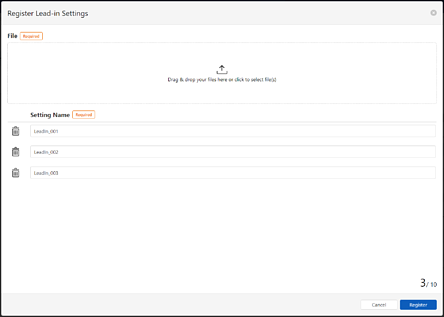
This is displayed when you click Add from the Lead-in or Lead-out settings in Lead-in / Lead-out Settings on the Job Allocation Settings screen. Note that the Job Allocation Settings screen is displayed when you click  (Settings) on the Work Order Management screen, and then select Job Allocation Settings from the menu on the left.
You can register Lead-in settings or Lead-out settings. When you use Continuous Processing, you need to register the Lead-in or Lead-out settings used during Continuous Processing.
Lead-in settings and Lead-out settings are files written in json format. You can register up to 50 files for each setting.
|
Item |
Description |
|
|---|---|---|
|
File(s) |
Select the Lead-in setting file or Lead-out setting file you want to register on each screen. You can only select files with the .json extension. You can register up to 10 files at once. |
|
|
Setting Name |
Displays the selected Lead-in settings or Lead-out settings. You can edit the Setting Name. You cannot use the following characters: \/:*?\"<>|. Click |
|
|
Cancel |
Click to cancel registration for the Lead-in or Lead-out settings and close the screen. |
|
|
Register |
Click to register the Lead-in or Lead-out settings and close the screen. |
|
 to clear the setting file and remove it from the list.