
Details of the Registering a Hot Folder Screen
On the Registering a Hot Folder screen, you can manage the registered hot folders from the computer where Epson PJ Agent for ECSP is installed. Hot folders registered with Epson digital front ends on the same computer are also displayed, but they cannot be unregistered or edited.
Hot folders that were created and automatically registered by Epson digital front ends can be edited or unregistered using the digital front ends that created them.
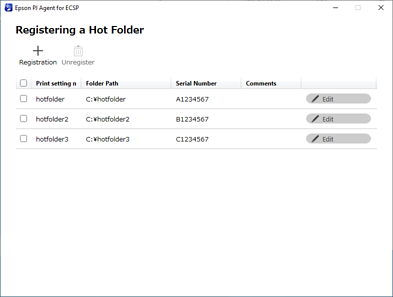
|
Item |
Description |
|---|---|
|
Registration |
Register a hot folder. Click to display the Registration screen. |
|
Unregister |
Remove the selected hot folder. |
|
Checkbox |
Select a hot folder. Click on the checkbox in the title item to select and clear all rows. You cannot select hot folders registered using anything other than Epson PJ Agent for ECSP. |
|
Print setting name |
Displays the print setting name set in the hot folder. |
|
Folder Path |
Displays the folder path for the hot folder. |
|
Serial Number |
Displays the serial number for the printer associated with the hot folder. |
|
Comments |
Displays the comment set when registering the hot folder. |
|
Edit |
Click to edit the hot folder information for that row. You cannot edit hot folders registered using anything other than Epson PJ Agent for ECSP. |
When you click an item, the contents are sorted by that item. Click again to switch between ascending and descending order.