
Details of the Edit file Screen
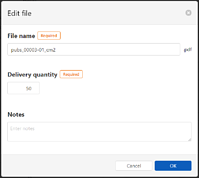
This is displayed when you click  next to the work order name on the Work Order Management screen, and then select Edit file. Note that the Edit file menu is displayed when In-progress is selected for the work order display switching button on the Work Order Management screen.
You can change the print file name, total number of copies to print, and notes.
|
Item |
Description |
|---|---|
|
File name |
Edit the print file name. |
|
Delivery Copies |
Change the total number of copies to print for each print file. Click the up and down arrows The maximum number varies depending on how the print file is registered.
|
|
Notes |
Enter a note for the print file. |
|
OK |
Click to apply the settings. |
|
Cancel |
Click to cancel changes and return to the Work Order Management screen. |
 to increase or decrease the number.